
Marketing Automation Workflows: 10 Proven Examples to Generate More Leads & Save Time
A homeowner visits your website on a Friday evening looking for an HVAC repair quote. They fill out your contact form, hoping to hear back quickly. Your office is already closed for the weekend, so no one sees the inquiry until Monday morning.
By then, they’ve already hired another company.
The frustrating part is that you didn’t lose the customer because your service wasn’t good enough—you lost them because nobody followed up in time.
Now imagine a different scenario.
The moment that same prospect submits the form, they receive a personalized text message confirming their request. A welcome email follows a few minutes later, your sales team is notified instantly, and a follow-up task is automatically created inside your CRM. If the customer doesn’t respond, the system sends timely reminders without anyone on your team lifting a finger.
That’s the power of a well-designed marketing automation workflow.
Instead of relying on manual follow-ups, marketing automation helps businesses respond faster, stay organized, and guide prospects through every stage of the customer journey. Whether your goal is to capture more leads, book more appointments, reduce no-shows, or nurture existing customers, the right workflow ensures every interaction happens at the right time.
In this guide, you’ll learn what marketing automation workflows are, how they work, how to build them strategically, and the essential workflows every small business should implement. We’ll also share practical examples, timing strategies, entry and exit rules, and GoHighLevel best practices you can apply to your own business.
What Is a Marketing Automation Workflow?
At its core, a marketing automation workflow is a series of automated actions that are triggered when a customer performs a specific action or meets certain conditions.
Think of it as a digital employee that never forgets to follow up.
Instead of relying on someone from your team to manually send emails, text messages, assign tasks, or update your CRM, the workflow takes over those repetitive tasks automatically. It ensures every lead or customer receives the right communication at the right time based on where they are in their journey.
For example, when someone submits a contact form on your website, you probably want to:
- Send an instant confirmation message.
- Notify your sales team.
- Create a follow-up task.
- Wait for a response.
- Send a reminder if they don’t reply.
- Stop all follow-ups once they book an appointment.
Without automation, someone has to remember every one of those steps.
With a marketing automation workflow, the entire process runs automatically.
A Simple Workflow Example
Here’s what a basic lead follow-up workflow might look like:
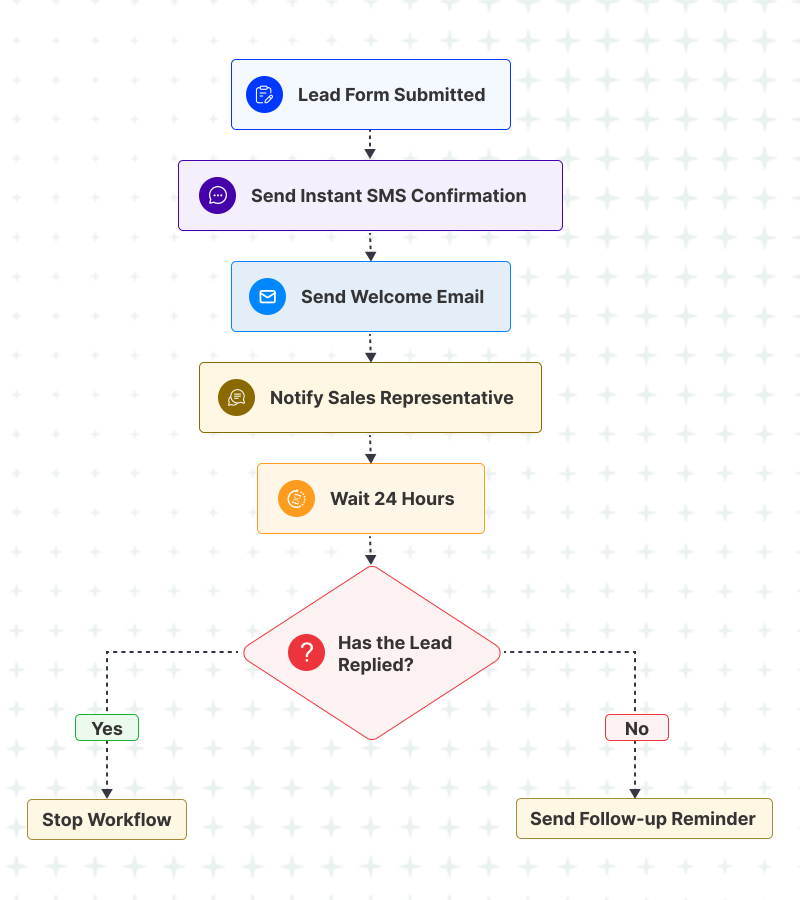
While this example is simple, modern marketing automation platforms like GoHighLevel can handle much more. A single workflow can qualify leads, assign them to the right salesperson, update pipeline stages, book appointments, request reviews, trigger AI conversations, and even launch entirely different workflows based on customer behavior.
The key is that every action is intentional. Rather than sending the same messages to everyone, workflows respond to what each customer does—or doesn’t do—creating a more personalized experience while reducing manual work for your team.
Key Characteristics of a Good Marketing Automation Workflow
Not every automation delivers good results. The most effective workflows share a few common characteristics:
- They start with a clear trigger. Every workflow begins because of a specific action, such as a form submission, missed call, appointment booking, or tag being added.
- They adapt to customer behavior. Good workflows make decisions based on what the customer does next. If someone replies, books a meeting, or becomes a customer, the workflow adjusts accordingly.
- They communicate across multiple channels. Rather than relying on email alone, effective workflows combine SMS, email, calls, tasks, AI conversations, and CRM updates to create a seamless experience.
- They know when to stop. One of the most overlooked aspects of automation is having clear exit conditions. Customers shouldn’t continue receiving follow-ups after they’ve already taken the desired action.
Pro Tip
The best workflows don’t automate everything—they automate the right things.
Start by identifying repetitive tasks that consume your team’s time, then build workflows that remove manual effort while improving the customer experience. A few well-designed automations will usually outperform dozens of disconnected ones.
Why Every Small Business Needs Marketing Automation Workflows
Running a small business is demanding. Between answering calls, responding to inquiries, managing appointments, and serving customers, it’s easy for important follow-ups to be delayed—or forgotten altogether.
A lead submits a contact form after business hours.
A proposal is sent but never followed up.
A customer misses their appointment because they didn’t receive a reminder.
A happy client leaves without being asked for a review.
These aren’t uncommon situations, and they don’t happen because businesses lack good intentions. They happen because manual processes can’t keep up as your business grows.
That’s where marketing automation workflows make a difference.
Instead of relying on someone to remember every task, workflows automatically respond to customer actions, keep your team informed, and ensure no opportunity is overlooked.
Common Problems Marketing Automation Solves
| Business Challenge | How Automation Helps |
|---|---|
| Slow responses to new leads | Instantly sends confirmations and alerts your team. |
| Missed follow-ups | Automatically nurtures leads until they respond or convert. |
| Appointment no-shows | Sends reminders and rescheduling messages. |
| Forgotten review requests | Requests feedback after completed services. |
| Inactive leads | Re-engages old contacts with targeted campaigns. |
| Repetitive manual tasks | Automates routine communication and CRM updates. |
The goal isn’t to replace human interaction—it’s to automate repetitive work so your team can focus on building relationships and closing more business.
Automation should remove repetitive tasks, not personal connections. The best workflows handle routine communication automatically while leaving meaningful conversations to your team.
How Marketing Automation Workflows Actually Work
Now that we’ve covered what marketing automation workflows are and why they matter, let’s look at how they work behind the scenes.
Every workflow—whether it’s a simple appointment reminder or a sophisticated lead nurturing campaign—follows the same basic logic.
It starts with an event, performs one or more actions, waits for a response, makes decisions based on customer behavior, and eventually ends when the goal has been achieved.
Think of it like a flowchart instead of a checklist.
A Typical Marketing Automation Workflow
Although every business has different processes, almost every successful marketing automation workflow is built using the same five components.
Components of an automation workflow
1. Trigger
Every workflow begins with a trigger.
A trigger is the event that tells your CRM to start the automation.
Without a trigger, nothing happens.
Common triggers include:
- Contact form submitted
- Missed phone call
- Appointment booked
- Tag added
- Opportunity moved to a new pipeline stage
- Customer purchases a service
- Quote sent
- Review request completed
Example
A visitor downloads your pricing guide.
That single action can automatically start a lead nurture workflow.
2. Conditions
Not every contact should receive the same automation.
Conditions allow the workflow to decide what should happen based on the information available.
For example:
- Is this a new lead or an existing customer?
- Which service are they interested in?
- Which location do they belong to?
- Have they already booked an appointment?
- Have they already received this campaign?
Instead of treating everyone the same, conditions personalize the customer journey.
3. Actions
Actions are the tasks your workflow performs.
This is where automation creates value.
Common actions include:
- Send an email
- Send an SMS
- Assign a sales representative
- Create an internal task
- Add or remove a tag
- Update the pipeline stage
- Book an appointment
- Notify your team
- Trigger another workflow
A single workflow can perform dozens of actions automatically, eliminating repetitive manual work.
4. Wait & Decision
One of the biggest mistakes businesses make is sending messages too quickly.
Effective workflows include waiting periods that give customers time to respond.
For example:
- Wait 30 minutes
- Wait one day
- Wait three days
- Wait until the appointment date
- Wait until business hours
After the waiting period, the workflow checks what happened.
Did the customer reply?
Did they book?
Did they make a purchase?
Based on the answer, the workflow either continues, changes direction, or ends.
This prevents customers from receiving unnecessary follow-ups after they’ve already taken action.
5. Exit Conditions
Every workflow should have a clear finish line.
Unfortunately, this is one of the most overlooked parts of marketing automation.
A customer who has already booked an appointment shouldn’t continue receiving booking reminders.
Someone who replies to your sales team shouldn’t keep receiving automated “Are you still interested?” messages.
Good exit conditions keep your communication relevant and prevent customers from feeling like they’re talking to a robot.
Common exit conditions include:
- Lead replied
- Appointment booked
- Opportunity won
- Purchase completed
- Customer opted out
- Tag removed
- Workflow goal achieved
Bringing It All Together
Let’s revisit our original example.
Imagine someone submits a quote request on your website.
Instead of relying on your team to remember every follow-up, your workflow could look like this:
| Step | Automation |
|---|---|
| Trigger | Quote request submitted |
| Condition | New lead |
| Action | Send confirmation SMS |
| Action | Notify sales team |
| Wait | 24 hours |
| Decision | Did the lead reply? |
| Yes | End workflow |
| No | Send reminder email |
| Wait | 2 days |
| Decision | Appointment booked? |
| Yes | Exit workflow |
| No | Create follow-up task |
Simple on the surface.
Powerful in practice.
Every workflow you’ll see later in this guide—from appointment reminders to review requests and reactivation campaigns—uses this same framework.
Before building any workflow, map it on paper first. If you can’t explain the workflow in a simple flowchart, it’s probably too complex. Start small, test thoroughly, and expand only when each step is working as expected.
How to Plan Your Marketing Automation Workflow Before You Build It
One of the biggest misconceptions about marketing automation is that you can simply open your CRM, drag a few actions onto a canvas, and expect great results.
In reality, successful workflows are planned long before they’re built.
The software doesn’t make a workflow effective—your strategy does.
Before creating any automation, take a step back and map out the customer journey. Think about what should happen, when it should happen, and what should happen next if the customer takes (or doesn’t take) the desired action.
At GHL Hero, we recommend using a simple planning framework before building any workflow.
The GHL Hero Workflow Planning Framework
Every effective workflow can be planned by answering seven simple questions.
1. What is the goal?
Start with the end in mind.
Ask yourself:
- What business problem am I trying to solve?
- What action do I want the customer to take?
Examples:
- Book an appointment
- Reply to a message
- Request a quote
- Complete a purchase
- Leave a review
A workflow without a clear goal usually becomes confusing and ineffective.
2. What should trigger the workflow?
Next, identify the event that should start the automation.
Common triggers include:
- Form submitted
- Missed call
- Appointment booked
- Proposal sent
- Tag added
- Invoice paid
- Customer inactive for 90 days
Choose the trigger that most accurately reflects the beginning of the customer journey you’re automating.
3. What should happen first?
The first interaction sets the tone.
Ask yourself:
If I were responding manually, what would I do first?
For many businesses, that might be:
- Send a confirmation SMS
- Thank the customer
- Notify the sales team
- Create a follow-up task
The first action should reassure the customer that their request has been received.
4. What should happen if they don’t respond?
Not everyone replies immediately.
Plan the follow-up path in advance.
For example:
- Wait one day.
- Send a reminder.
- Wait two more days.
- Try a different channel.
- Assign a call task.
Having a clear follow-up strategy helps maintain momentum without overwhelming the customer.
5. When should the workflow stop?
This is where many businesses make mistakes.
Define your exit conditions before you build the workflow.
Examples include:
- Customer replied
- Appointment booked
- Deal marked as Won
- Customer opted out
- Goal achieved
A good workflow always knows when its job is done.
6. Which communication channels should you use?
Different messages deserve different channels.
For example:
| Goal | Recommended Channel |
|---|---|
| Instant acknowledgement | SMS |
| Educational content | |
| High-value opportunities | Phone Call |
| Appointment reminders | SMS + Email |
| Internal follow-up | CRM Task |
Using the right channel at the right time improves both engagement and customer experience.
7. How will you measure success?
Every workflow should have at least one measurable outcome.
Examples include:
- Response rate
- Appointment bookings
- Proposal acceptance
- Conversion rate
- Review requests completed
- Revenue generated
If you can’t measure the outcome, you won’t know whether the workflow is actually working.
Choosing the Right Marketing Automation Workflow for Your Business
Every Business Doesn’t Need Every Workflow
One of the biggest mistakes businesses make is trying to automate everything from day one.
The most successful automation strategies start small. Instead of building ten workflows at once, identify the areas where your team spends the most time or where opportunities are most often lost.
For some businesses, that might be responding to new leads. For others, it could be reducing appointment no-shows or following up on proposals.
Start with the workflow that solves your biggest operational challenge, then expand your automation strategy over time.
Which Workflow Should You Build First?
| If your biggest challenge is… | Start with this workflow |
|---|---|
| Slow responses to new leads | Lead Follow-up Workflow |
| Missed phone calls | Missed Call Text Back Workflow |
| Low appointment attendance | Appointment Reminder Workflow |
| Quotes that never receive a response | Proposal Follow-up Workflow |
| Customers forget to leave reviews | Review Request Workflow |
| Old leads have gone cold | Reactivation Workflow |
| New customers need guidance | Customer Onboarding Workflow |
| You want more repeat business | Upsell & Cross-Sell Workflow |
A Simple Priority Framework
Rather than asking,
“Which workflow is easiest to build?”
Ask yourself:
- Which manual task consumes the most time?
- Where are we losing the most revenue?
- Which customer journey feels inconsistent?
- Which process repeats every day?
The answers will usually reveal your highest-priority automation.
Imagine you’re a home service business receiving 20–30 inquiries every week.
If it takes your team several hours to respond to every inquiry, you’ll probably lose some potential customers simply because they found another provider first.
In this situation, a Lead Follow-up Workflow should take priority over a review request or a reactivation campaign because improving response times will have a more immediate impact on revenue.
On the other hand, if your sales team already responds quickly but struggles to close estimates, a Proposal Follow-up Workflow may deliver a better return.
The best automation strategy isn’t about building more workflows—it’s about solving your biggest bottleneck first.
Build workflows in the order of business impact, not feature availability. Every new workflow should solve a real operational problem or remove a repetitive task. When each automation has a clear purpose, your system stays easier to manage and delivers measurable results.
10 Best Marketing Automation Workflows for your business
| # | Workflow | Purpose |
|---|---|---|
| 1 | Lead Follow-up Workflow | Respond instantly to new enquiries. |
| 2 | Lead Nurture Workflow | Build trust and educate prospects until they’re ready to buy. |
| 3 | Appointment Booking & Reminder Workflow | Increase attendance and reduce no-shows. |
| 4 | Missed Call Text Back Workflow | Recover opportunities from unanswered calls. |
| 5 | Proposal Follow-up Workflow | Stay top of mind and improve quote acceptance. |
| 6 | Customer Onboarding Workflow | Deliver a smooth start for new customers. |
| 7 | Review Request Workflow | Generate more positive online reviews. |
| 8 | Reactivation Workflow | Re-engage inactive leads and past customers. |
| 9 | Upsell & Cross-Sell Workflow | Increase customer lifetime value. |
| 10 | Referral Request Workflow | Turn satisfied customers into new business opportunities. |
1. Lead Follow-up Workflow
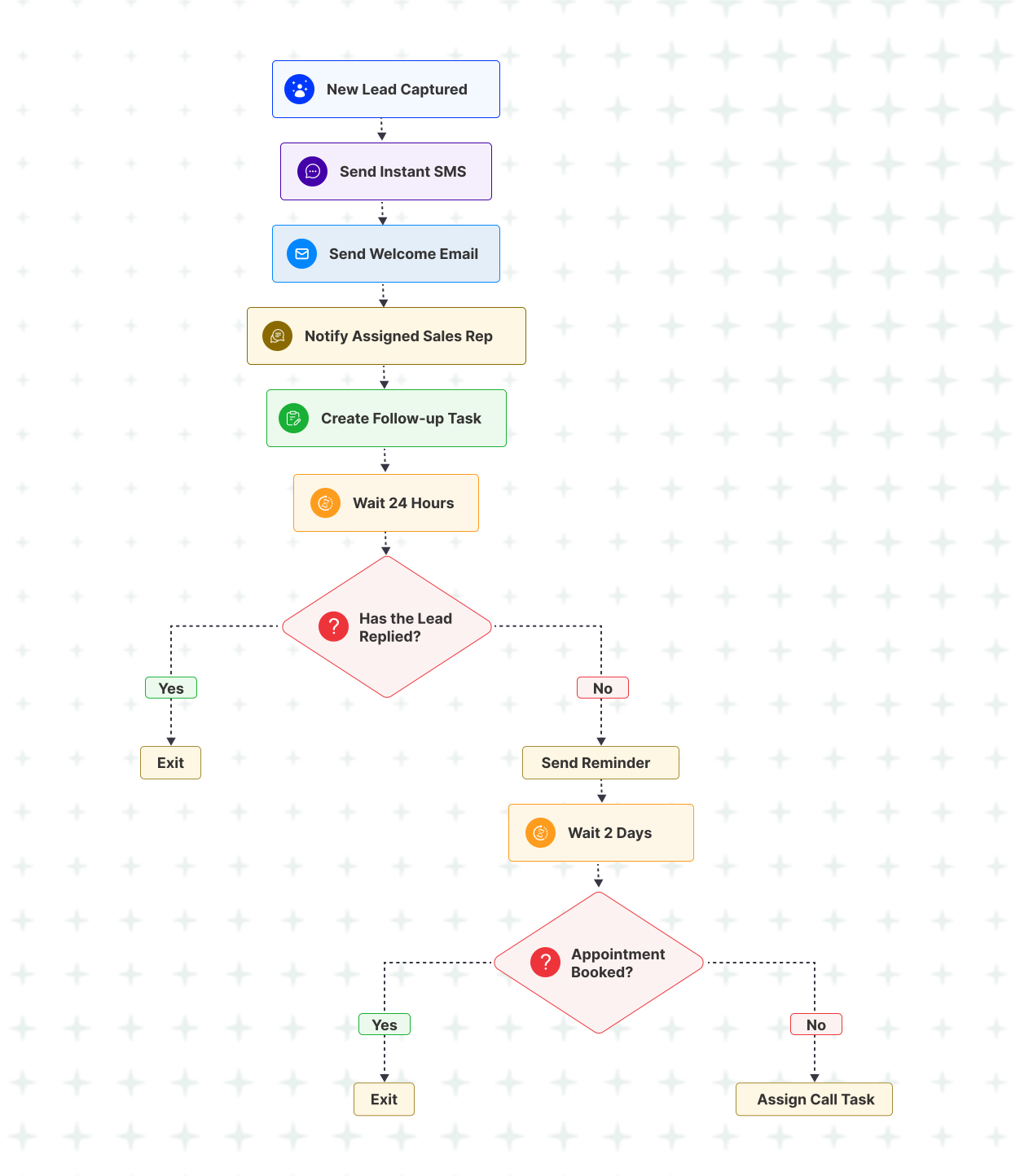
Never Let a New Lead Go Cold
Every new enquiry is a potential customer—but only if you respond in time. Whether someone fills out a contact form, clicks a Facebook Lead Ad, starts a website chat, or calls your business, delayed follow-ups often mean lost opportunities.
A Lead Follow-up Workflow ensures every inquiry receives an immediate acknowledgement, alerts the right team member, and keeps the conversation moving until the prospect responds or takes the next step.
| Goal | Respond to every new lead quickly and consistently. |
| Best For | Home services, agencies, law firms, dental clinics, real estate, and any business generating enquiries. |
| Trigger | New lead captured through a form, chatbot, missed call, ad campaign, or CRM integration. |
Business Outcomes
- Capture more opportunities by responding while prospects are still actively looking for a solution.
- Reduce lead leakage with instant acknowledgements and timely follow-ups—even outside business hours.
- Save your team’s time by automating repetitive follow-ups and notifications.
- Create a professional first impression that builds trust from the very first interaction.
Pro Tip
Keep your first automated message simple. Confirm that you’ve received the enquiry, let the prospect know what happens next, and make it easy for them to reply. The goal is to start a conversation—not close the sale in the first message.
2. Lead Nurture Workflow
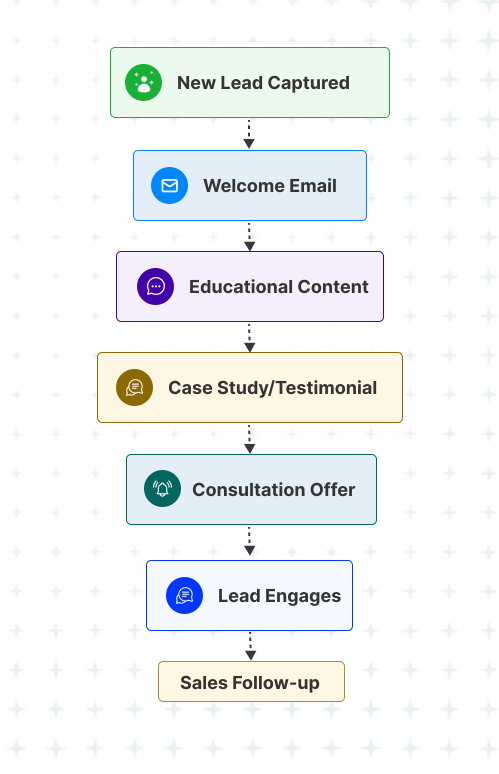
Stay Top of Mind Until Prospects Are Ready to Buy
Not every lead is ready to make a decision after their first interaction with your business. Some need more information, some are comparing providers, and others simply aren’t ready yet. A Lead Nurture Workflow keeps your business visible with helpful content, timely follow-ups, and valuable insights until the prospect is ready to take the next step.
| Goal | Build trust and keep prospects engaged until they’re sales-ready. |
| Best For | Agencies, consultants, home services, healthcare, education, B2B businesses. |
| Trigger | Lead downloads a resource, requests information, or enters the CRM without booking an appointment. |
Business Outcomes
- Build trust through consistent and valuable communication.
- Increase conversion rates by educating prospects before asking for the sale.
- Stay top of mind while leads compare different providers.
- Reduce missed opportunities from prospects who aren’t ready to buy immediately.
Pro Tip
Focus on educating rather than selling. Helpful content builds confidence and naturally moves prospects closer to making a decision.
3. Appointment Booking & Reminder Workflow
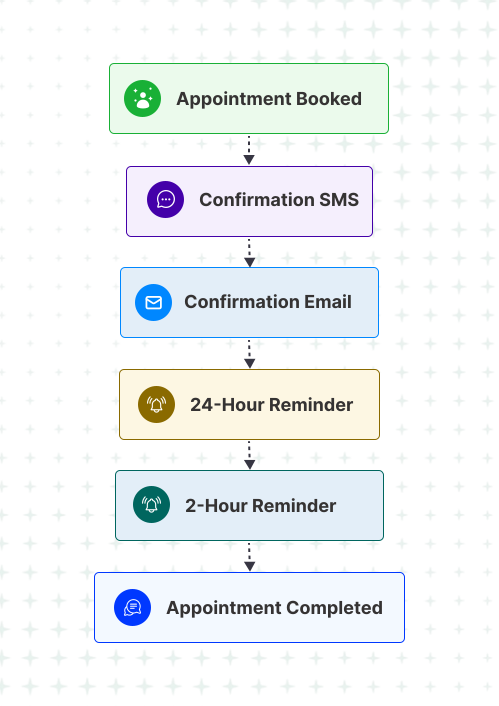
Reduce No-Shows and Keep Your Calendar Full
Booked appointments are valuable, but they only generate revenue when customers actually show up. Automated confirmations and reminders help reduce forgotten appointments while making it easy for customers to reschedule if needed.
| Goal | Reduce appointment no-shows and improve attendance. |
| Best For | Dentists, clinics, coaches, consultants, salons, home services. |
| Trigger | Appointment booked. |
Business Outcomes
- Reduce no-shows with timely reminders.
- Improve customer experience through clear communication.
- Keep your schedule organized without manual confirmations.
- Recover more appointments with easy rescheduling options.
Pro Tip
Include a reschedule link in your reminders. It’s better to move an appointment than lose it completely.
4. Missed Call Text Back Workflow
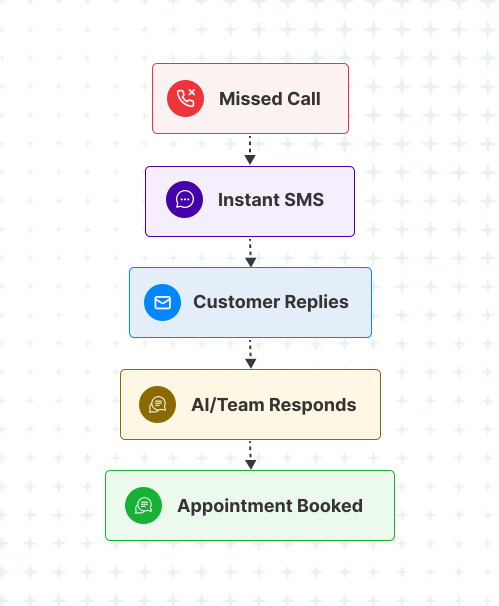
Turn Missed Calls Into New Opportunities
Every missed call could be a lost customer. A Missed Call Text Back Workflow immediately acknowledges the caller, keeps the conversation going, and gives them an easy way to continue without waiting for your team.
| Goal | Recover leads from missed calls. |
| Best For | Home services, healthcare, legal, local businesses. |
| Trigger | Incoming call is missed. |
Business Outcomes
- Recover more enquiries that would otherwise be lost.
- Improve responsiveness even when your team is unavailable.
- Increase appointment bookings from missed calls.
- Provide a better customer experience after unsuccessful call attempts.
Pro Tip
Ask a simple question in your first text, such as “How can we help you today?” to encourage a reply.
5. Proposal Follow-up Workflow
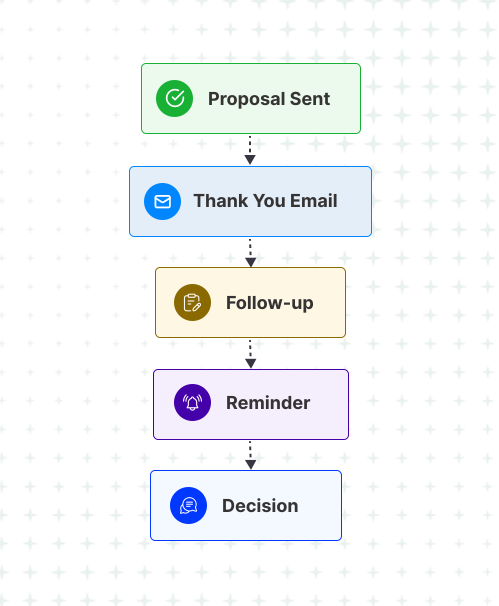
Stay Top of Mind After Sending a Proposal
Sending a proposal is only the beginning. Without consistent follow-up, many qualified opportunities simply go quiet. A Proposal Follow-up Workflow keeps the conversation moving until the prospect makes a decision.
| Goal | Increase proposal response rates. |
| Best For | Agencies, consultants, contractors, B2B service providers. |
| Trigger | Proposal or quote sent. |
Business Outcomes
- Increase proposal responses through timely follow-ups.
- Reduce forgotten quotes sitting in inboxes.
- Help sales teams stay consistent without manual reminders.
- Improve close rates by staying visible during the decision-making process.
Pro Tip
Every follow-up should provide value—answer common questions, share a success story, or explain your process rather than simply asking, “Have you decided?”
6. Customer Onboarding Workflow
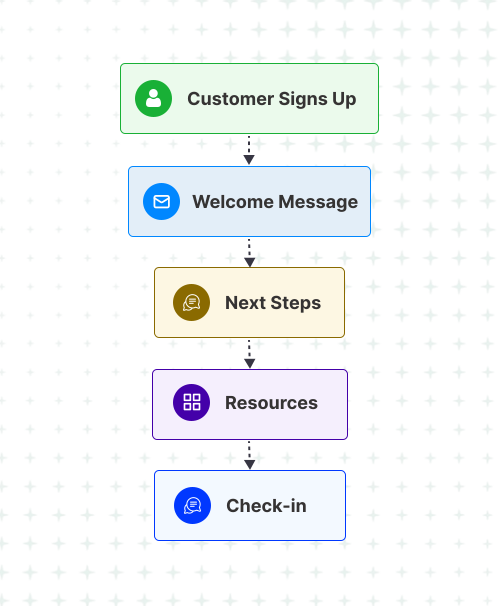
Deliver a Great First Experience
Winning a customer is just the beginning. A structured onboarding workflow sets expectations, answers common questions, and helps customers get value from your service faster.
| Goal | Create a smooth onboarding experience. |
| Best For | Agencies, SaaS, consultants, coaches, service businesses. |
| Trigger | Deal marked as Won or payment received. |
Business Outcomes
- Improve customer satisfaction from day one.
- Reduce onboarding questions through proactive communication.
- Build confidence in your service.
- Increase customer retention with a smoother start.
Pro Tip
Don’t overwhelm new customers with too much information. Deliver it in small, easy-to-follow steps.
7. Review Request Workflow
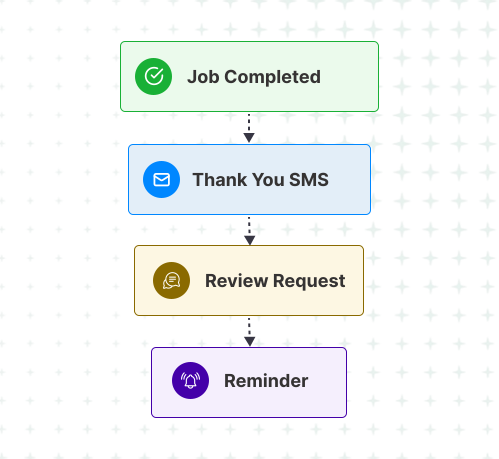
Turn Happy Customers Into 5-Star Reviews
Satisfied customers often forget to leave reviews. Automating your review requests helps you consistently build trust and strengthen your online reputation.
| Goal | Generate more online reviews. |
| Best For | Every local service business. |
| Trigger | Service completed or appointment marked complete. |
Business Outcomes
- Increase positive reviews consistently.
- Improve local search visibility with fresh customer feedback.
- Build social proof that influences future buyers.
- Reduce manual follow-up after completed jobs.
Pro Tip
Ask for feedback while the experience is still fresh—ideally within a few hours of completing the service.
8. Reactivation Workflow
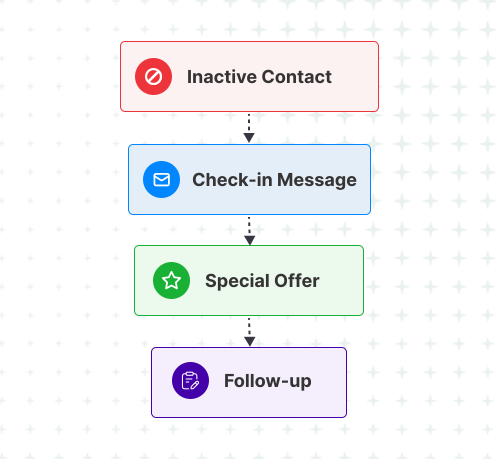
Bring Cold Leads Back to Life
Not every lead converts the first time. A reactivation workflow gives inactive contacts a reason to reconnect with your business. To re-activate the old data, you can also use calls as well. GHL also gives a power dialer feature which you can utilize without spending anything on third party power dialer software.
| Goal | Re-engage inactive leads and past customers. |
| Best For | Service businesses, agencies, healthcare, retail. |
| Trigger | No activity for 60–90 days. |
Business Outcomes
- Recover dormant opportunities without generating new leads.
- Increase repeat business from existing contacts.
- Maximize the value of your CRM.
- Reduce customer churn over time.
Pro Tip
Keep your reactivation message conversational. Asking “Are you still looking for help with…?” often performs better than leading with a discount.
9. Upsell & Cross-Sell Workflow
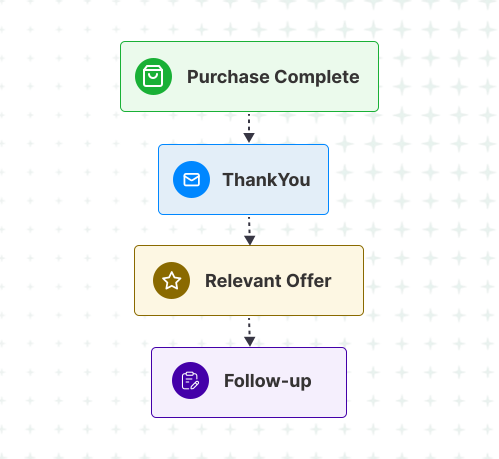
Increase Revenue From Existing Customers
Your existing customers already trust your business, making them more likely to purchase additional services. A targeted upsell workflow helps you recommend the right offer at the right time.
| Goal | Increase customer lifetime value. |
| Best For | Service businesses, agencies, healthcare, coaching. |
| Trigger | Service completed or purchase made. |
Business Outcomes
- Increase average customer value without acquiring new leads.
- Promote complementary services at the right moment.
- Strengthen customer relationships through relevant recommendations.
- Generate repeat revenue automatically.
Pro Tip
Recommend services that naturally complement what the customer has already purchased instead of promoting unrelated offers.
10. Referral Request Workflow
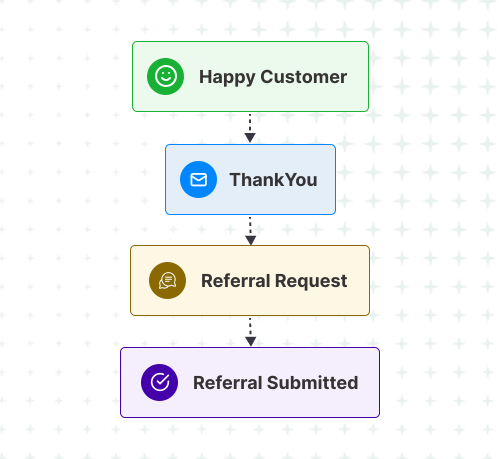
Turn Happy Customers Into Your Best Marketing Channel
Your happiest customers can become your most valuable source of new business. A Referral Request Workflow makes it easy for them to recommend your services to friends, family, and colleagues.
| Goal | Generate referrals from satisfied customers. |
| Best For | Every service-based business. |
| Trigger | Positive review received, job completed, or customer reaches a success milestone. |
Business Outcomes
- Generate qualified referrals from satisfied customers.
- Lower customer acquisition costs by leveraging word-of-mouth.
- Strengthen brand loyalty through ongoing engagement.
- Create a sustainable growth channel that compounds over time.
Pro Tip
Ask for referrals after you’ve delivered clear value—not immediately after a sale. Timing has a significant impact on response rates.
Bringing It All Together
Marketing automation isn’t about replacing people—it’s about removing repetitive work so your team can focus on what they do best: building relationships and closing business.
You don’t need to implement all ten workflows overnight. Start with the one that solves your biggest business challenge, whether that’s responding to new leads faster, reducing appointment no-shows, following up on proposals, or generating more customer reviews.
As your business grows, continue adding workflows that support different stages of the customer journey. Over time, these individual automations become a connected system that saves time, improves consistency, and creates a better experience for every customer.
The most successful businesses don’t automate everything—they automate the right things.
Ready to Build Marketing Automation That Actually Works?
Knowing which workflows to build is one thing. Designing them around your business processes, customer journey, and sales goals is where the real value lies.
At GHL Hero, we help businesses design and implement GoHighLevel automation systems that do more than send emails or text messages. We build workflows that capture leads, nurture prospects, book appointments, reduce manual work, improve customer experiences, and support long-term business growth.
Whether you’re setting up your first workflow or optimizing an existing GoHighLevel account, we’ll help you create automation that’s practical, scalable, and tailored to the way your business operates.
???? Book a free strategy call today and let’s build a marketing automation system that works for your business—not against it.
Frequently Asked Questions
1. What is a marketing automation workflow?
A marketing automation workflow is a sequence of automated actions triggered by a customer’s behavior or a specific business event. It helps automate repetitive tasks such as lead follow-ups, appointment reminders, review requests, and customer onboarding while ensuring timely and consistent communication.
2. What’s the difference between a workflow and a drip campaign?
A drip campaign follows a fixed sequence of messages over time. A workflow is more dynamic—it can make decisions based on customer behavior, pause, branch into different paths, or stop automatically when a goal is achieved.
3. Which marketing automation workflow should I build first?
For most service-based businesses, the Lead Follow-up Workflow delivers the quickest impact because it helps respond to new enquiries immediately and reduces the chances of losing leads to faster competitors.
4. How many workflows does a small business need?
There isn’t a fixed number. Most businesses can start with three to five core workflows, such as lead follow-up, appointment reminders, customer onboarding, review requests, and reactivation campaigns. As your business grows, you can introduce additional workflows to support more stages of the customer journey.
5. Can GoHighLevel automate both marketing and sales processes?
Yes. GoHighLevel allows you to automate email and SMS campaigns, appointment reminders, pipeline updates, task creation, lead nurturing, review requests, customer onboarding, AI conversations, and much more—all from a single platform.
6. How long does it take to build a marketing automation workflow?
A simple workflow can often be built in a few hours, while more advanced automations involving multiple communication channels, decision branches, CRM updates, and integrations may take several days to plan, test, and optimize.
7. What’s the biggest mistake businesses make with marketing automation?
One of the most common mistakes is creating automations without clear goals or exit conditions. This can result in duplicate messages, poor customer experiences, and workflows that continue even after the customer has already responded or converted.
8. Can marketing automation work for small businesses?
Absolutely. In fact, small businesses often see the biggest benefits because automation helps them deliver a fast, consistent customer experience without needing to hire additional staff. It enables smaller teams to operate more efficiently while focusing their time on high-value activities.