

GoHighLevel Power Dialer: How to Build a Free Sales Dialer Inside GHL
Stop Paying for Expensive Power Dialers — GoHighLevel Already Has One.
When people think about GoHighLevel, they usually talk about funnels, CRM, automation, SMS marketing, email campaigns, and pipelines.
But there's one feature that almost nobody talks about.
And honestly, it might be one of the most powerful sales tools built into the platform.
The GoHighLevel Power Dialer.
Most businesses spend hundreds of dollars every month on third-party power dialer software.
Meanwhile, GoHighLevel users already have access to a browser-based power dialer built directly into their CRM.
No additional software.
No complicated integrations.
No extra monthly subscriptions.
Just a simple system that allows your team to call leads back-to-back without manually opening contacts, searching phone numbers, or wasting time between calls.
If your sales team relies on outbound calling, this feature can significantly increase productivity and help you connect with more leads every day.
GoHighLevel Power Dialer: How to Build a Free Sales Dialer Inside GHL
What Is the GoHighLevel Power Dialer?
How the GoHighLevel Power Dialer Actually Works
How to Setup GoHighLevel Power Dialer
Why the GoHighLevel Power Dialer Is a Game-Changer for Sales Teams
Best Use Cases for the GoHighLevel Power Dialer
Pro Tips to Maximize Your Results with the GoHighLevel Power Dialer
What Is the GoHighLevel Power Dialer?
The GoHighLevel Power Dialer is a built-in calling system that allows users to move through a list of contacts sequentially and make calls directly from the browser.
Instead of manually finding contacts and dialing one by one, GoHighLevel automatically creates a call queue and guides your team through the next lead after each call.
The result?
More calls per hour
Faster lead follow-up
Better sales productivity
No need for expensive dialer software
Everything logged directly inside your CRM
The best part is that it's already available within GoHighLevel.
How the GoHighLevel Power Dialer Actually Works
The Power Dialer is built around two main components:
1. Manual Actions Queue
This is where your call list lives.
Every lead that should be called gets added to the Manual Actions section inside Conversations.
Your sales team can then work through the queue one contact at a time.
2. Workflow Automation
The second component is a workflow that automatically pushes contacts into the call queue.
This workflow determines:
Which contacts should be called
When they should be called
Who should call them
Together, these two features create a fully functional Power Dialer system.
How to Setup GoHighLevel Power Dialer
Step 1: Create a Workflow to Build Your Call Queue
The first step is creating a workflow.
This workflow will automatically send contacts into the Power Dialer queue.
There are several ways to trigger this workflow:
Pipeline stage changes
Form submissions
Appointment bookings
Smart list enrollment
Tag added
For this example, we'll use a tag.
Trigger Setup
Create a workflow with:
Trigger: Contact Tag Added
Tag: Dial
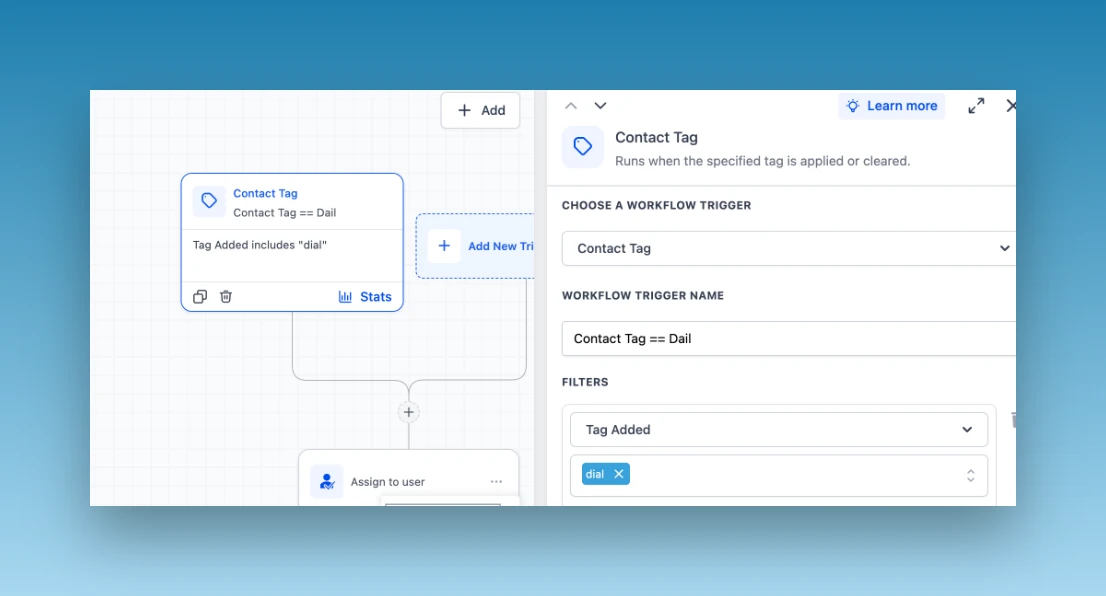
Whenever the "Dial" tag is added to a contact, the workflow will begin.
Step 2: Assign a User
After the trigger, add an action to assign the contact owner.
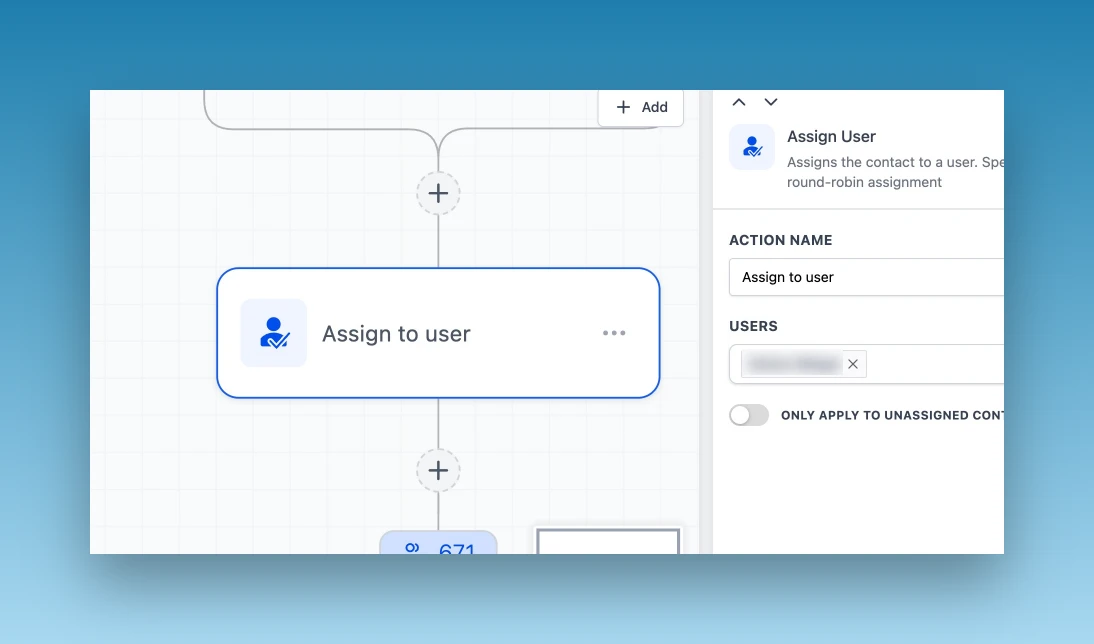
You can choose either:
Option 1: Round Robin Assignment
Perfect for sales teams.
Each lead gets assigned to a different user automatically.
Option 2: Single User Assignment
Perfect for solo businesses or dedicated sales reps.
Every lead gets assigned to one specific user.
This ensures the correct team member receives the call task.
Step 3: Add the Manual Call Action
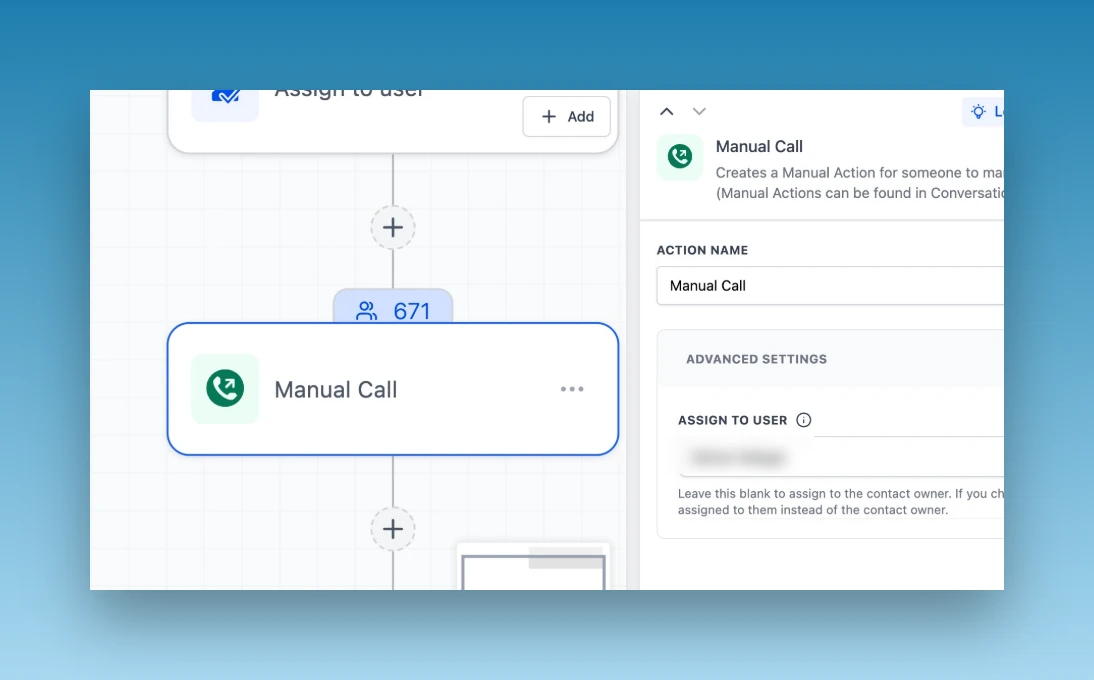
This is where the magic happens.
Inside the workflow:
Click Add Action
Search for: Manual Call
Add the Manual Call action.
You can either:
Dynamically assign the contact owner
Select a specific user
Once this step runs, GoHighLevel automatically places the contact into the Manual Actions queue.
Step 4: Publish the Workflow
That's it.
At this stage, your Power Dialer automation is already 50% complete.
Whenever the "Dial" tag is added:
Contact enters workflow
User gets assigned
Manual Call task is created
Contact appears inside the Power Dialer queue
Now let's activate the dialing side.
Step 5: Open the Manual Actions Queue
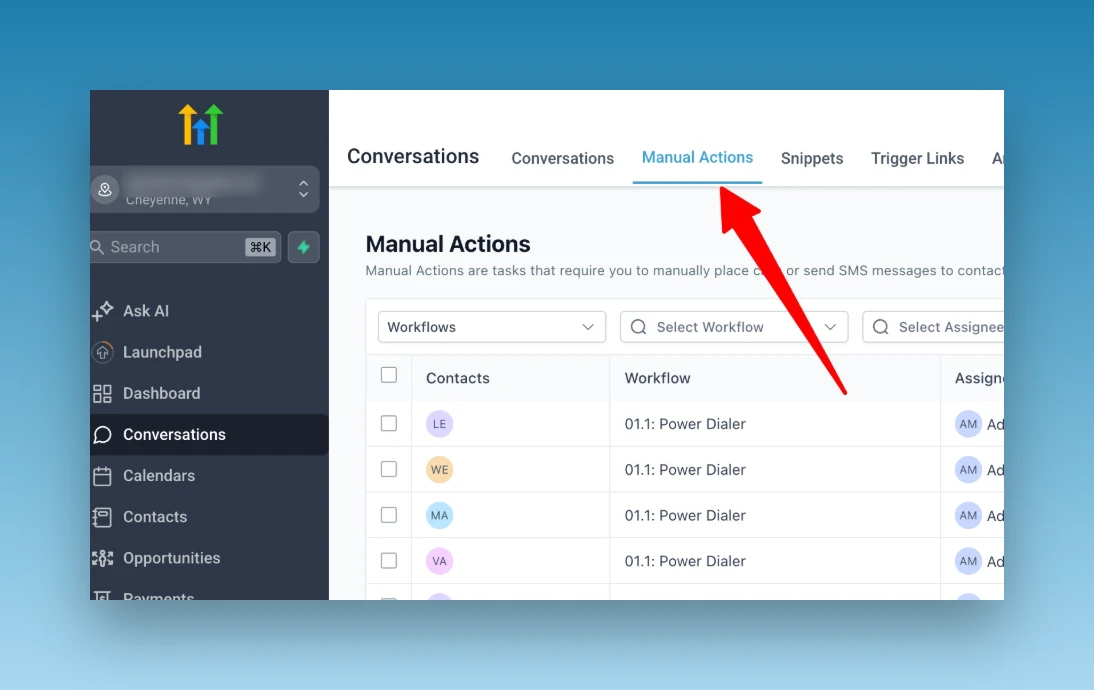
Navigate to:
Conversations → Manual Actions
This is where your Power Dialer call list appears.
Inside the queue you'll see:
Contact name
Assigned user
Task type
Creation date
Status
Workflow source
Every contact added through the workflow will appear here automatically.
Step 6: Start Calling
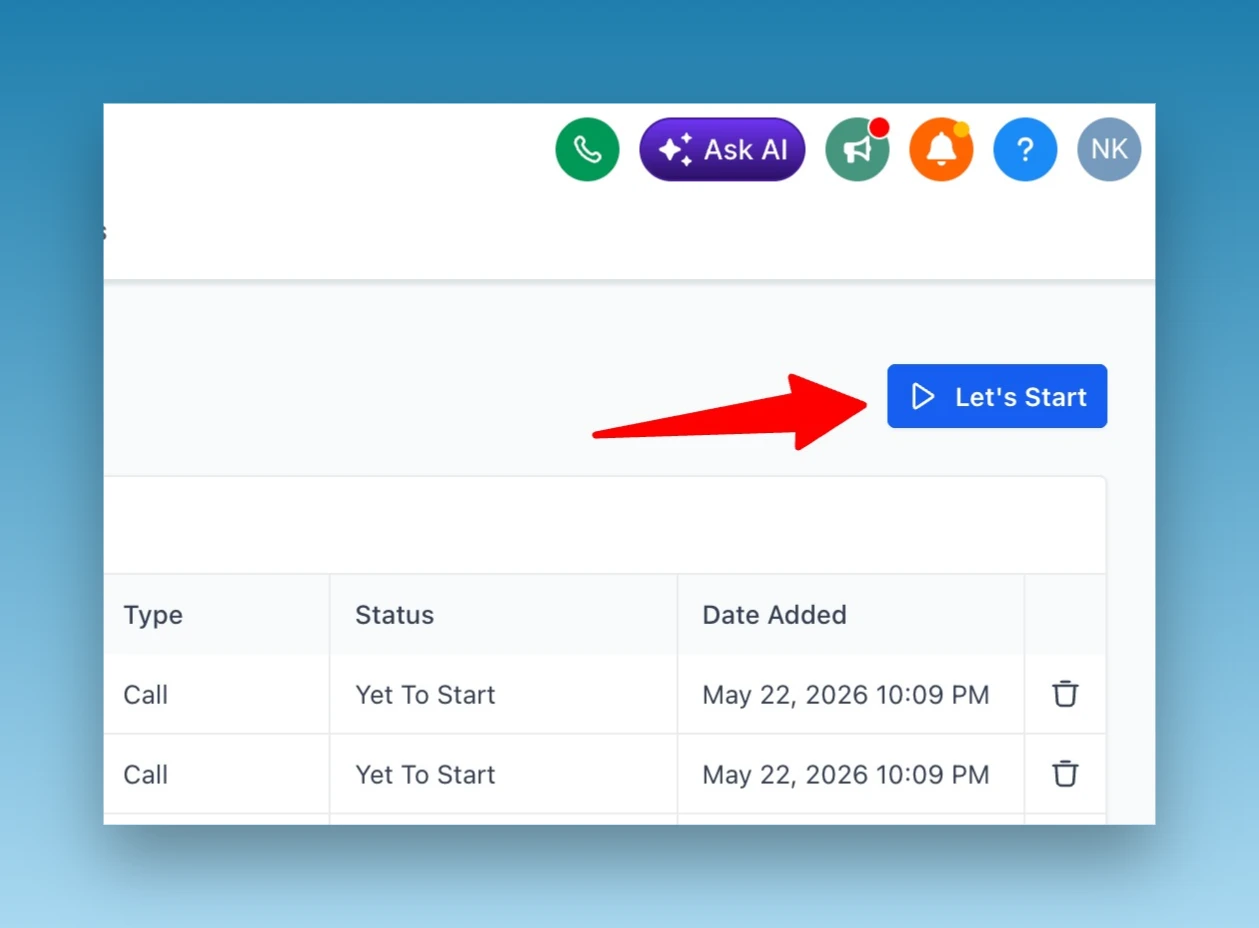
Inside Manual Actions you'll see a button called:
"Let's Start"
Click it.
GoHighLevel immediately starts your calling session.
The system will:
Open the first contact
Start the call
Allow you to log outcomes
Move you toward the next lead
No manual searching.
No switching screens.
No wasted time.
What Happens After Each Call?
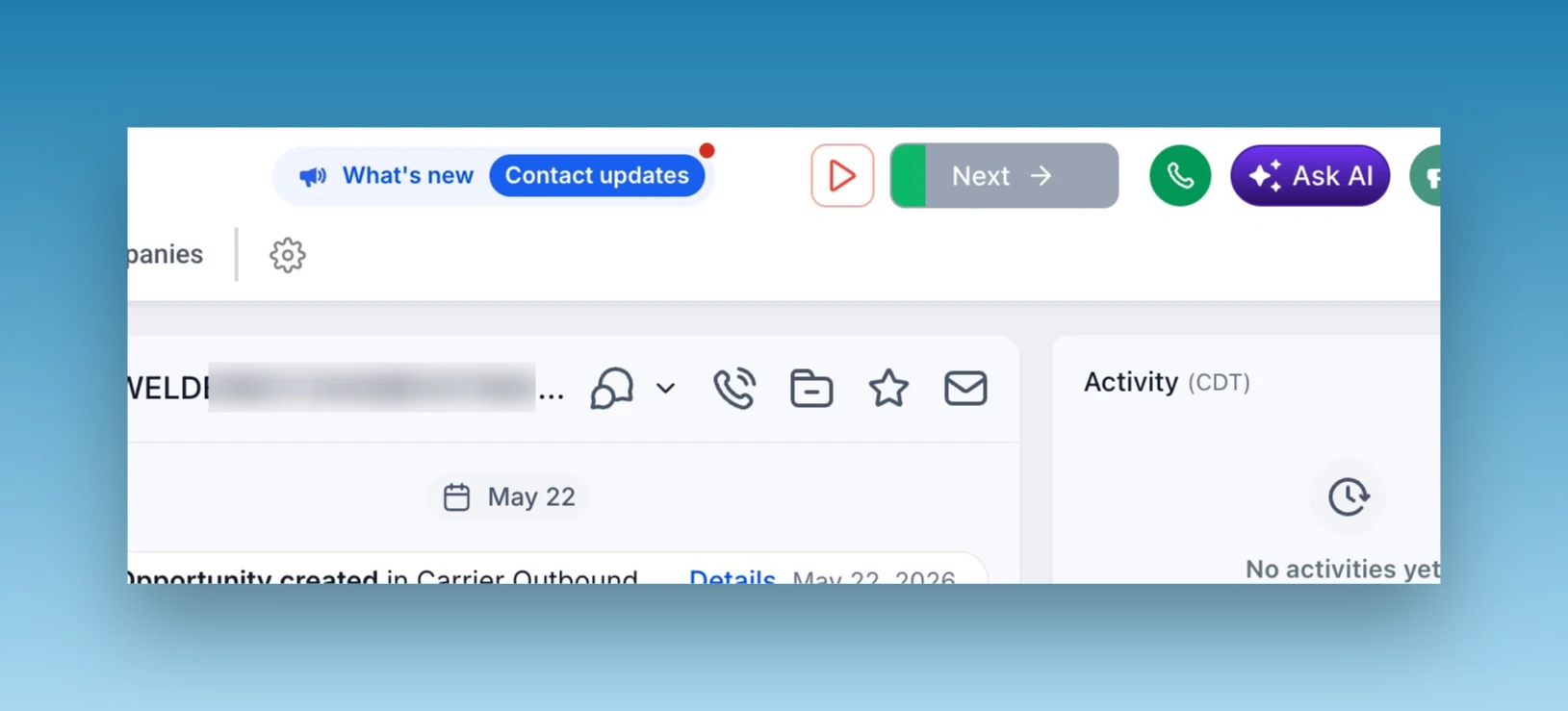
Once a call ends, you have several options:
Move to Next Contact
Start the next call immediately.
Pause the Dialer
Need a break?
Pause anytime.
Redial the Lead
Call the same contact again if needed.
Log Notes and Outcomes
Keep your CRM updated in real time.
Everything remains attached to the contact record for future follow-up.
Why the GoHighLevel Power Dialer Is a Game-Changer for Sales Teams
Most sales teams don't struggle because they lack leads.
They struggle because they waste valuable time between calls.
Think about a typical outbound sales process. A salesperson opens a contact record, finds the phone number, makes the call, leaves notes, updates the CRM, and then starts the entire process again for the next lead.
Those small actions may only take a few seconds each, but when repeated hundreds of times every week, they add up to hours of lost productivity.
The GoHighLevel Power Dialer eliminates this friction by creating a streamlined calling experience that keeps your team focused on what actually drives revenue—having conversations with prospects.
More Conversations, Less Admin Work
Instead of manually searching for leads and dialing numbers, reps can move through a structured call queue with just a few clicks. This means less time navigating the CRM and more time speaking with potential customers.
Faster Lead Response Times
Research consistently shows that the faster you contact a lead, the higher your chances of converting them. By automatically adding leads to a calling queue, your team can follow up while interest is still high.
Complete CRM Visibility
Every call, note, task, and outcome remains attached to the contact record. Managers can easily review activity, track performance, and ensure that no lead falls through the cracks.
Reduced Software Costs
Many businesses pay for separate power dialer solutions in addition to their CRM. Since GoHighLevel already includes the core functionality needed for outbound calling, many businesses can reduce or eliminate the need for additional software subscriptions.
Better Team Accountability
Because call tasks are assigned to specific users and tracked inside the CRM, managers can easily monitor activity levels and ensure follow-up processes are being completed consistently.
Simply put, the GoHighLevel Power Dialer helps businesses create a faster, more organized, and more scalable outbound calling process without adding more tools to their tech stack.
Best Use Cases for the GoHighLevel Power Dialer
One of the biggest advantages of the GoHighLevel Power Dialer is its flexibility. Whether you're a solo business owner or managing a large sales team, it can be adapted to fit almost any outbound calling workflow.
Real Estate Lead Follow-Up
Real estate agents often receive leads from multiple sources, including Facebook Ads, Google Ads, Zillow, and website forms. The Power Dialer allows agents to instantly queue new leads and contact them before competitors do.
Database Reactivation Campaigns
Most businesses are sitting on thousands of old leads that were never properly followed up with. By applying a simple tag and triggering a workflow, you can create a dedicated call queue for reactivation campaigns and uncover opportunities hidden in your database.
Appointment Setting Teams
Companies that rely on booked appointments can use the Power Dialer to quickly contact new inquiries, confirm appointments, reschedule no-shows, and follow up with prospects who haven't yet committed.
Home Service Businesses
Roofing companies, HVAC businesses, plumbers, electricians, solar providers, and other service-based businesses can create targeted call lists for estimate follow-ups, quote approvals, and customer check-ins.
Insurance and Financial Services
When speed matters, the Power Dialer helps agents respond quickly to quote requests, policy inquiries, and follow-up opportunities while maintaining detailed records inside the CRM.
Agency Sales Teams
Marketing agencies can use the Power Dialer to manage outbound prospecting campaigns, follow up with inbound leads, and conduct database reactivation campaigns without needing third-party calling platforms.
Customer Retention and Upsell Campaigns
The Power Dialer isn't just for sales. Businesses can also use it to reconnect with existing customers, gather feedback, promote new services, and generate repeat business.
The common theme across all these use cases is simple: whenever your team needs to make a high volume of calls efficiently, the Power Dialer can help streamline the process.
Pro Tips to Maximize Your Results with the GoHighLevel Power Dialer
Setting up the Power Dialer is easy. Getting the most out of it requires a little strategy.
Here are some practical tips we use when implementing GoHighLevel systems for our clients.
Create Separate Call Queues for Different Lead Types
Not all leads should be treated the same.
Create separate tags and workflows for:
New Leads
Hot Prospects
Follow-Up Calls
Missed Appointments
Database Reactivation
Existing Customers
This helps your team prioritize the right conversations at the right time.
Use Round Robin Assignment for Fair Lead Distribution
If multiple sales representatives are making calls, use GoHighLevel's round-robin assignment feature to distribute opportunities evenly and avoid lead ownership conflicts.
Combine Calling with Automated SMS Follow-Ups
Not every lead will answer the phone.
Create workflows that automatically send a text message after a missed call attempt. This increases response rates and gives prospects another way to engage.
Build Pipeline-Based Call Queues
Instead of manually tagging contacts, automatically add Manual Call Actions whenever an opportunity moves into a specific pipeline stage. This creates a seamless sales process with minimal manual effort.
Track Call Outcomes Consistently
Create standardized tags or custom fields for outcomes such as:
Connected
No Answer
Left Voicemail
Interested
Not Interested
Follow-Up Required
This makes reporting and future automation significantly easier.
Schedule Daily Power Dialing Sessions
Many successful sales teams dedicate specific blocks of time each day solely to outbound calling. By combining these focused sessions with the GoHighLevel Power Dialer, teams can dramatically increase call volume and consistency.
Pair the Power Dialer with AI and Automation
For even better results, combine the Power Dialer with GoHighLevel workflows, AI-powered follow-ups, appointment reminders, and nurture campaigns. This creates a complete lead management system that works around the clock.
The businesses that see the greatest success with the Power Dialer aren't just making more calls—they're building repeatable systems that ensure every lead receives timely and consistent follow-up.
Final Thoughts
The GoHighLevel Power Dialer is one of the most overlooked features in the entire platform.
While many businesses spend hundreds of dollars every month on separate dialer software, GoHighLevel users can build a fully functional browser-based power dialer using workflows and Manual Call Actions.
The setup takes only a few minutes.
The productivity gains can be massive.
If your business relies on outbound sales, lead follow-up, appointment setting, or database reactivation, this is a feature you should start using immediately.